
Plan the journey. Together.
Nomad turns forwarded confirmations, screenshots, and a group chat full of links into one shared plan: every day, booking, place, and shared cost, kept in step for the whole trip.
- Accessibility documented
- Not open yet

A trip gets planned in forty places. Nomad makes it one.
The flight is in one inbox and the hotel in another. The restaurant list lives in a group chat, and who paid for dinner lives in somebody's notes app. By the second day, nobody is sure which version of the plan is the real one.
- Who it is for
- Couples, friends, and families planning a trip together, and anyone who travels often enough to be tired of retyping confirmation numbers.
- What it replaces
- The shared spreadsheet, the screenshot folder, the thread you scroll through for an address, and the arithmetic at the end about who owes whom.
- What it keeps
- Every booking, document, and decision in one place the whole trip can open, so nobody has to ask which version is the real one.
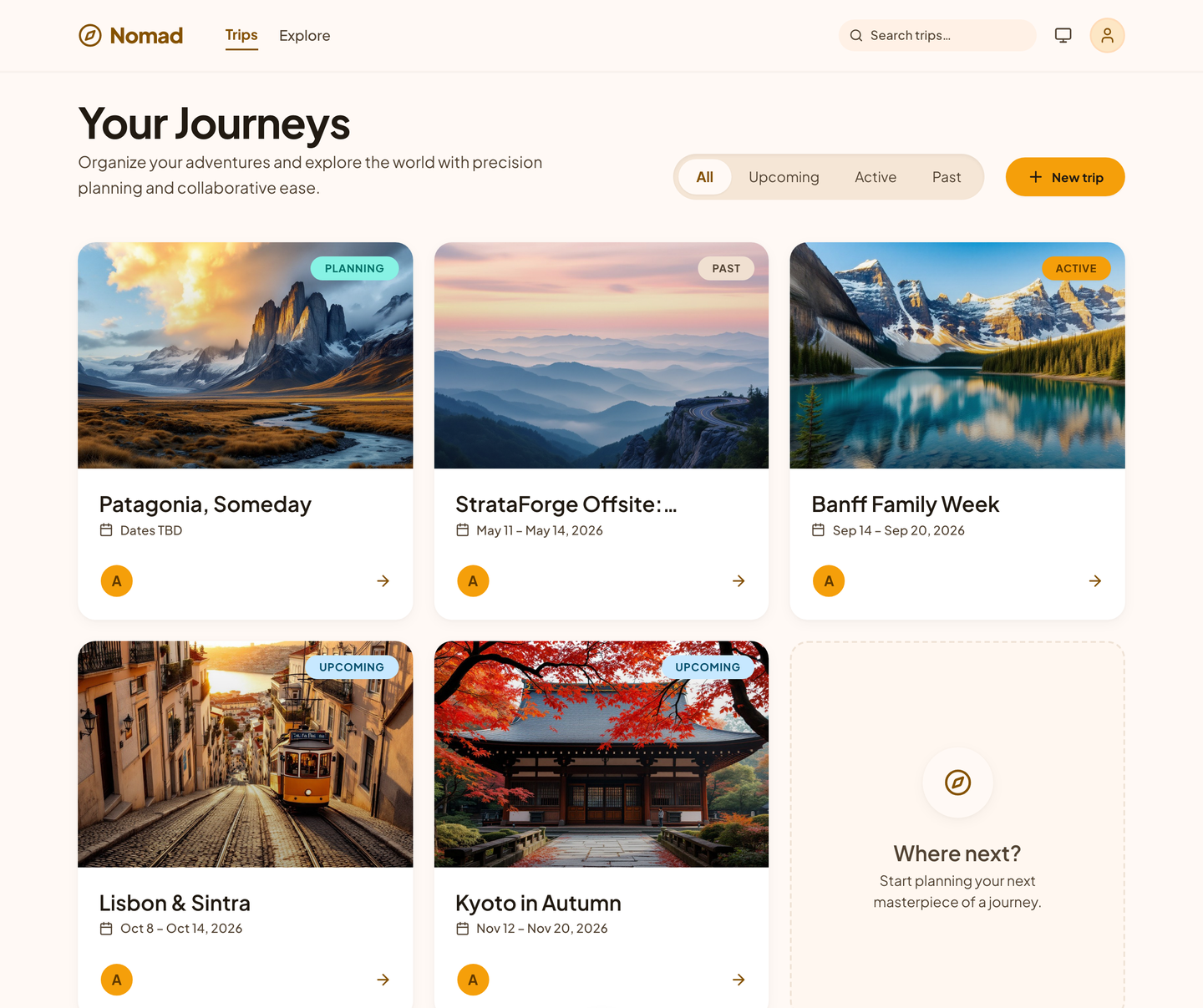
Where you are going, where you are, and where you have been.
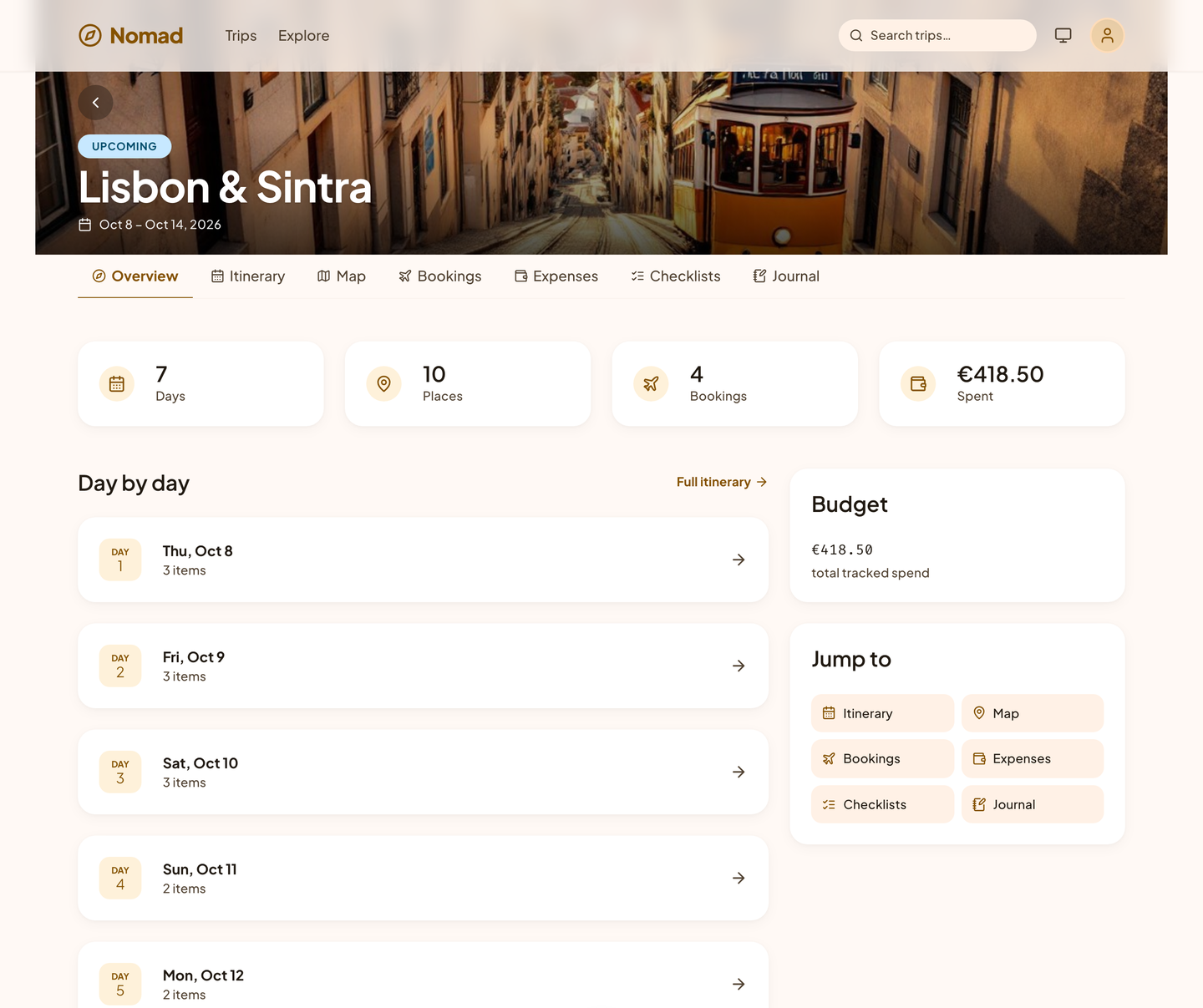
Each trip opens onto its own days, bookings, map, checklists, costs, and journal, and Nomad keeps track of which trips are coming up, underway, or done.
Six stages. One plan the whole way.
- Plan
- Days, places, and ideas, put in the order that saves you time on the ground.
- Book
- Forward a confirmation email, and Nomad files the flight, the hotel, or the table on the right day.
- Pack
- Packing and prep lists shaped by where you are going, for how long, and what the weather will be.
- Go
- Your itinerary, bookings, and map open on your phone's browser.
- Settle
- Costs in 11 currencies, split the way you agreed, with one tap to see who owes whom.
- Remember
- A journal of the trip with photos, ready to publish as a travelogue when you are home.
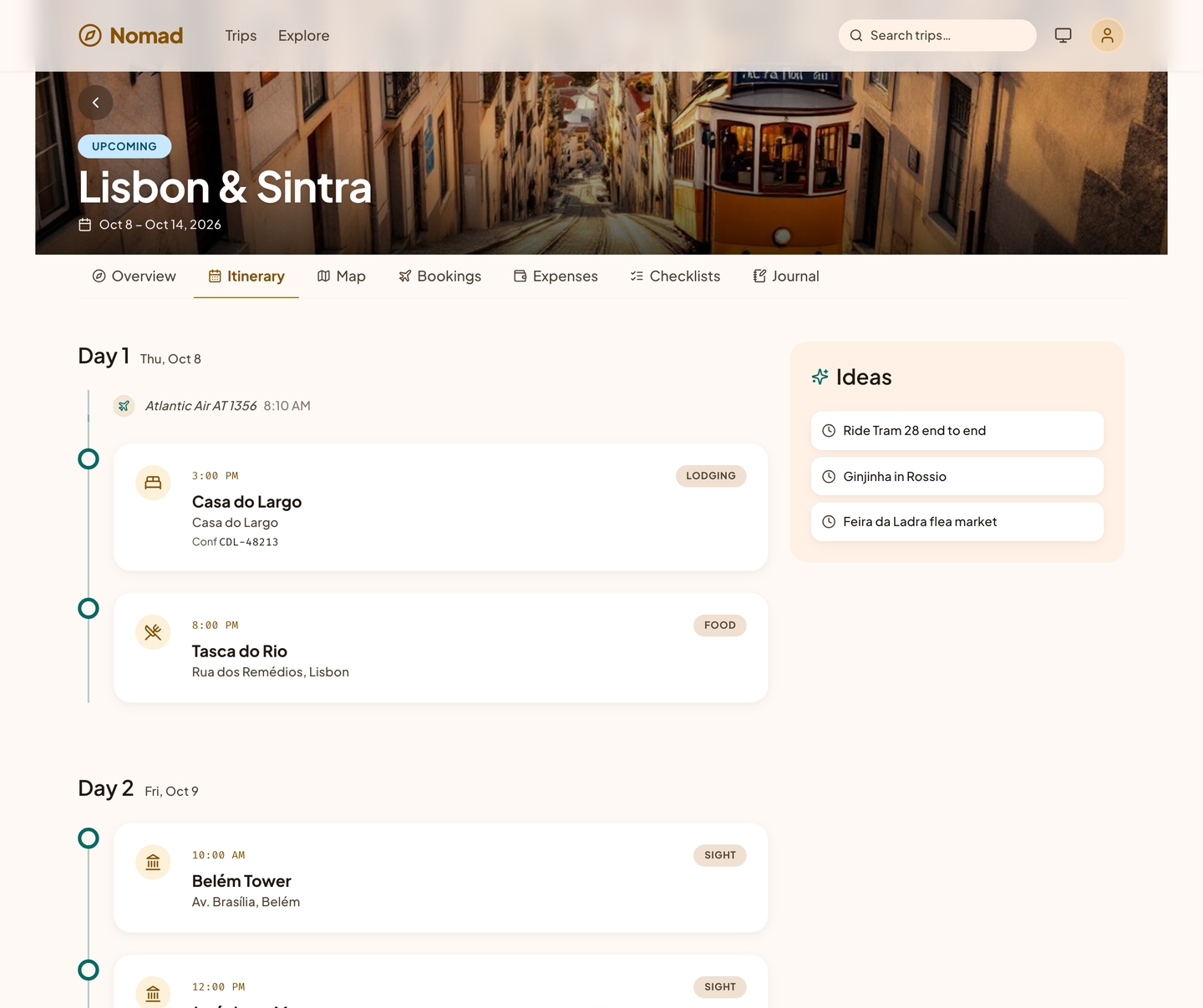
Every day, in order. Down to the hour.
Nomad lays the trip out day by day. Flights, check-ins, tables, and tours land at their times, and the places you might visit wait in Ideas until you give them a day.
- Optimize a day to cut the time between stops.
- Travel time between stops, and a warning when two plans collide.
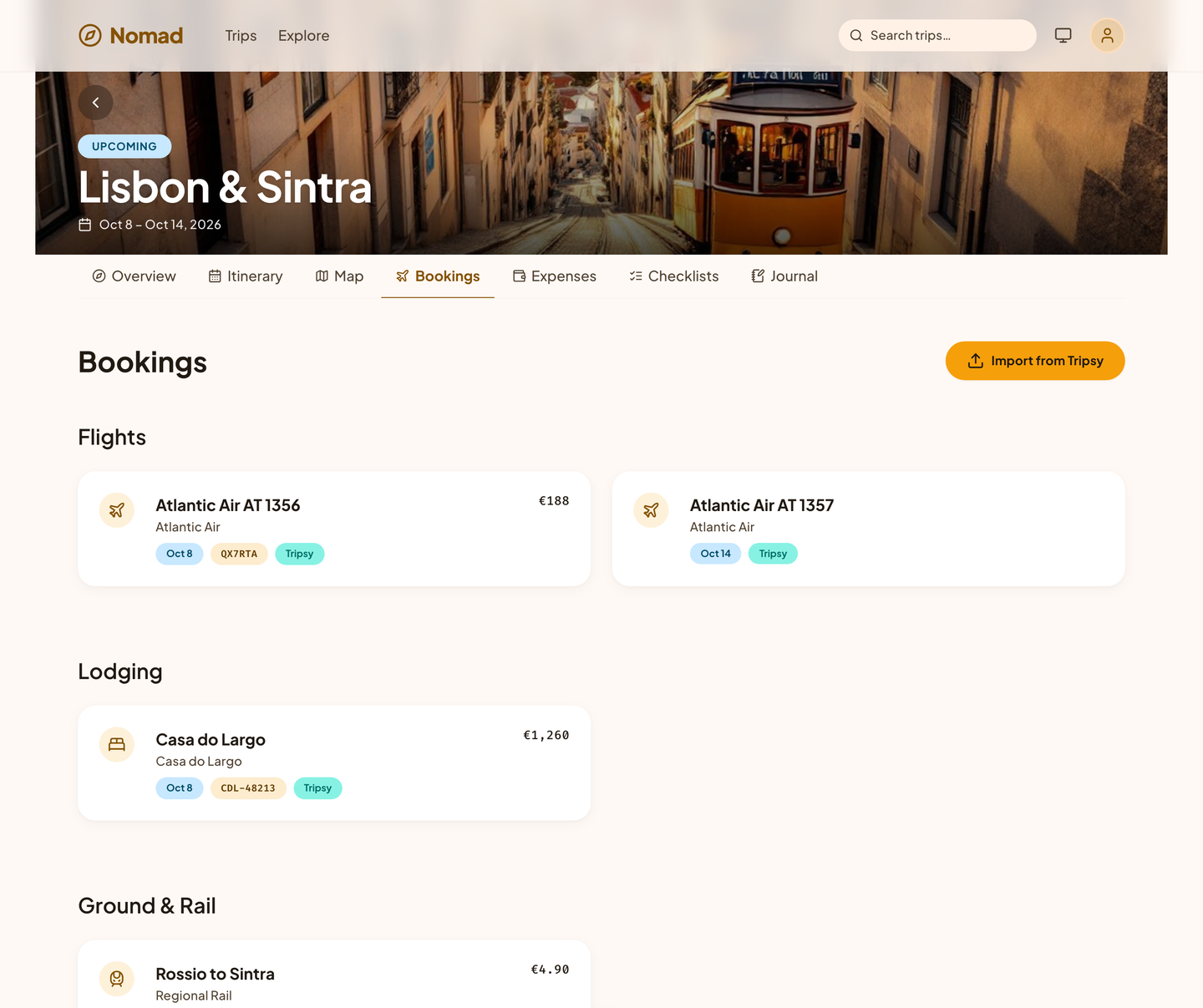
Forward the email. Nomad files the booking.
Flights, lodging, car rentals, trains, buses, ferries, restaurants, tours, and events, each with the details that matter on the day: confirmation number, terminal, seat, and check-in time.
- A review queue for everything read from an email, so nothing is added without you.
- Documents attached to the booking they belong to: e-tickets, visas, and insurance.
- Flights anchor the plan at both ends, across time zones.
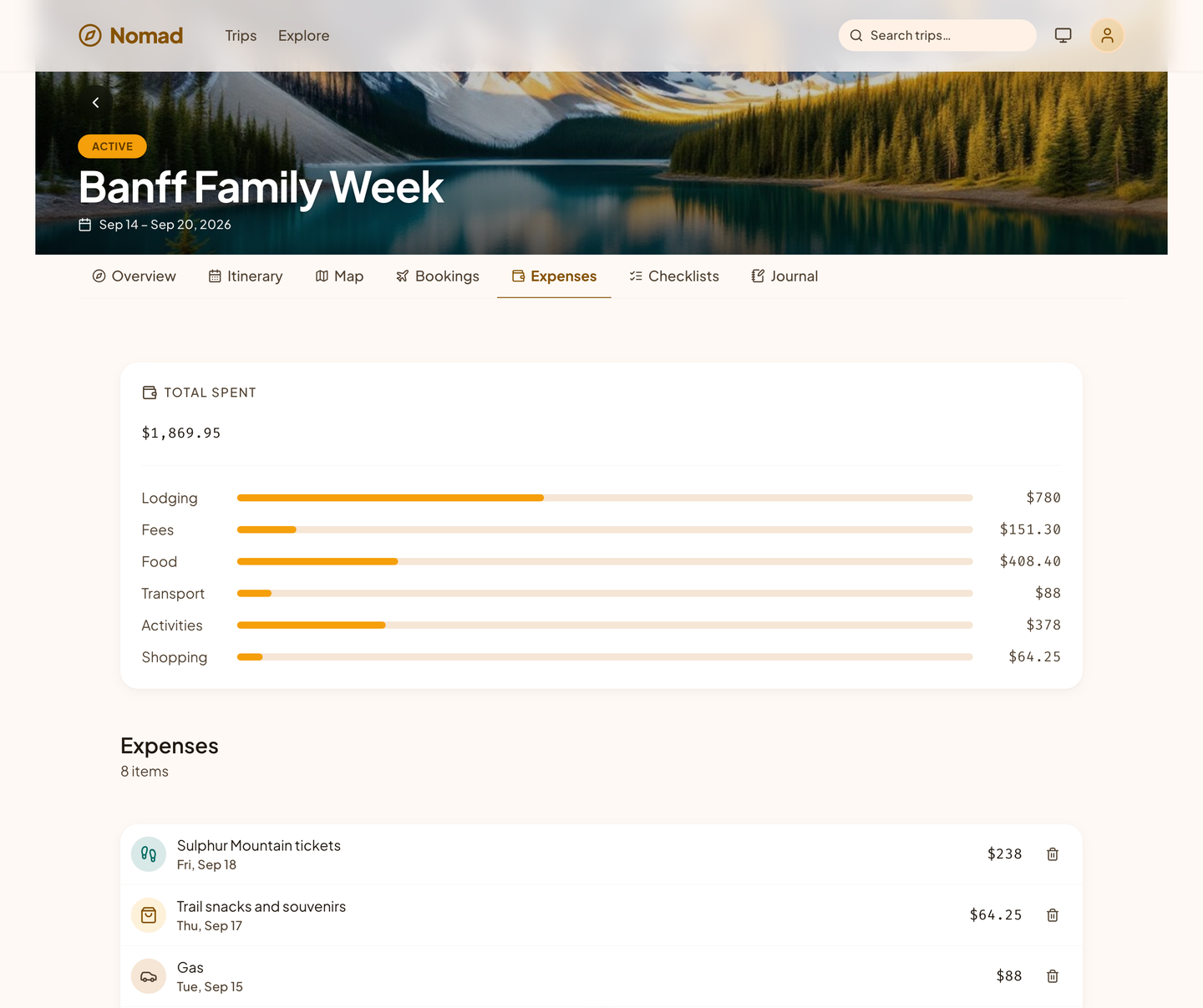
Split it fairly. Settle it in one tap.
Log a cost in the currency you paid it in. Nomad converts it to your home currency, totals it by category, and keeps a running balance for everyone on the trip.
- Split equally, by exact amounts, or by shares.
- Settle up with the fewest payments between you.
- Export reimbursable costs for work trips.
Nothing left on the bed. Nothing left undone.
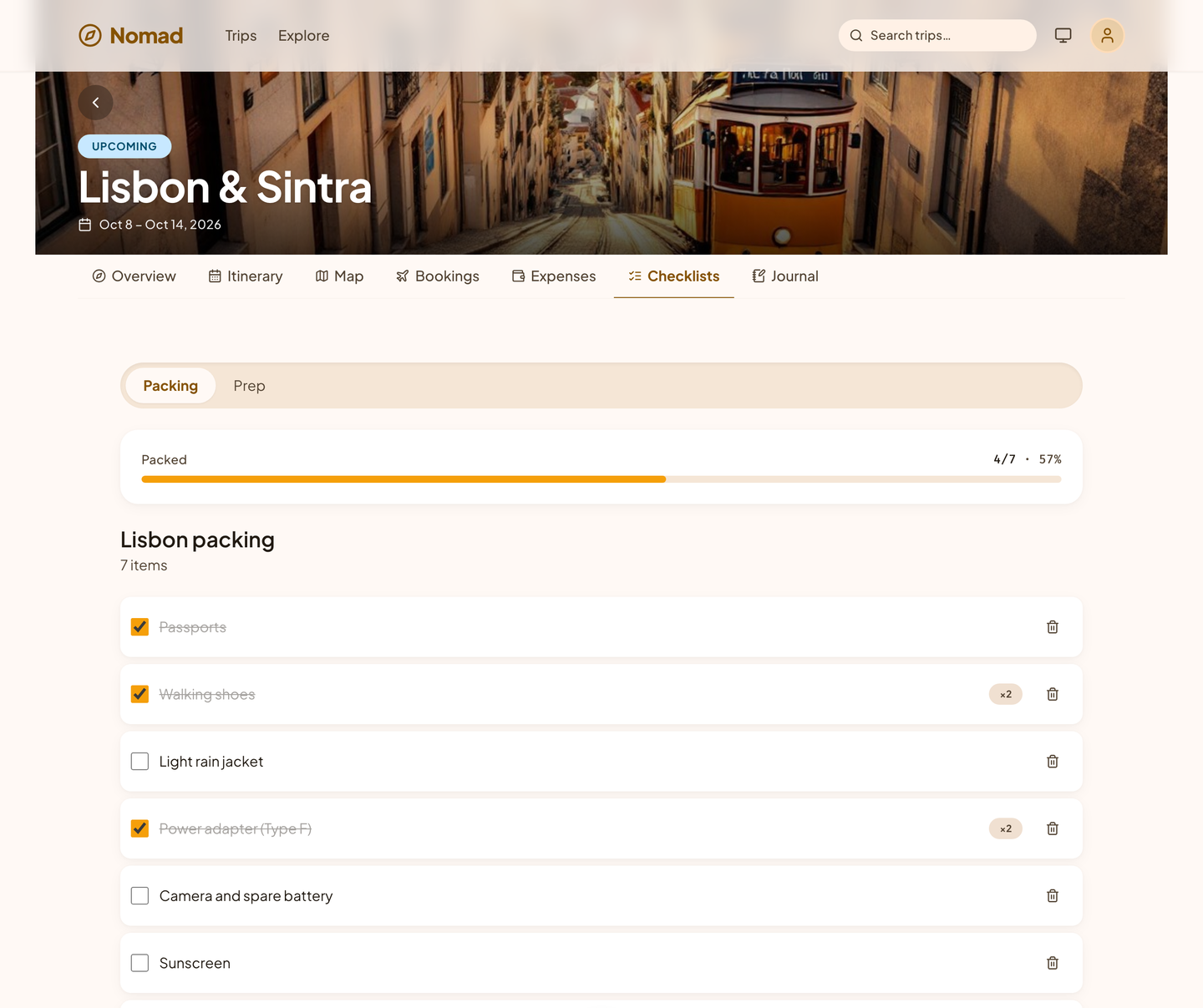
Every trip gets a packing list and a before-you-go list, with quantities, due dates, and who is bringing what.
- Lists shaped by the trip: the climate, the length, and what you plan to do.
- Due dates on every prep task.
- Checked off together on the shared list.
One plan. Everyone on the same page.
Nomad is built for trips with more than one person on them, from a weekend for two to a family reunion.
- Invite your people
- Invite by email or with a link. Owners manage the trip, editors plan it, and viewers follow along.
- One shared plan
- Everyone on the trip works from the same plan. Live updates and a view of who else is planning are not in the web app yet.
- Comments where they belong
- Ask about the dinner reservation on the reservation itself, and mention someone to bring them in.
- A link for everyone else
- Share a read-only itinerary and map with family at home. They need no account to see it.
Keep the story. Share it when you get home.
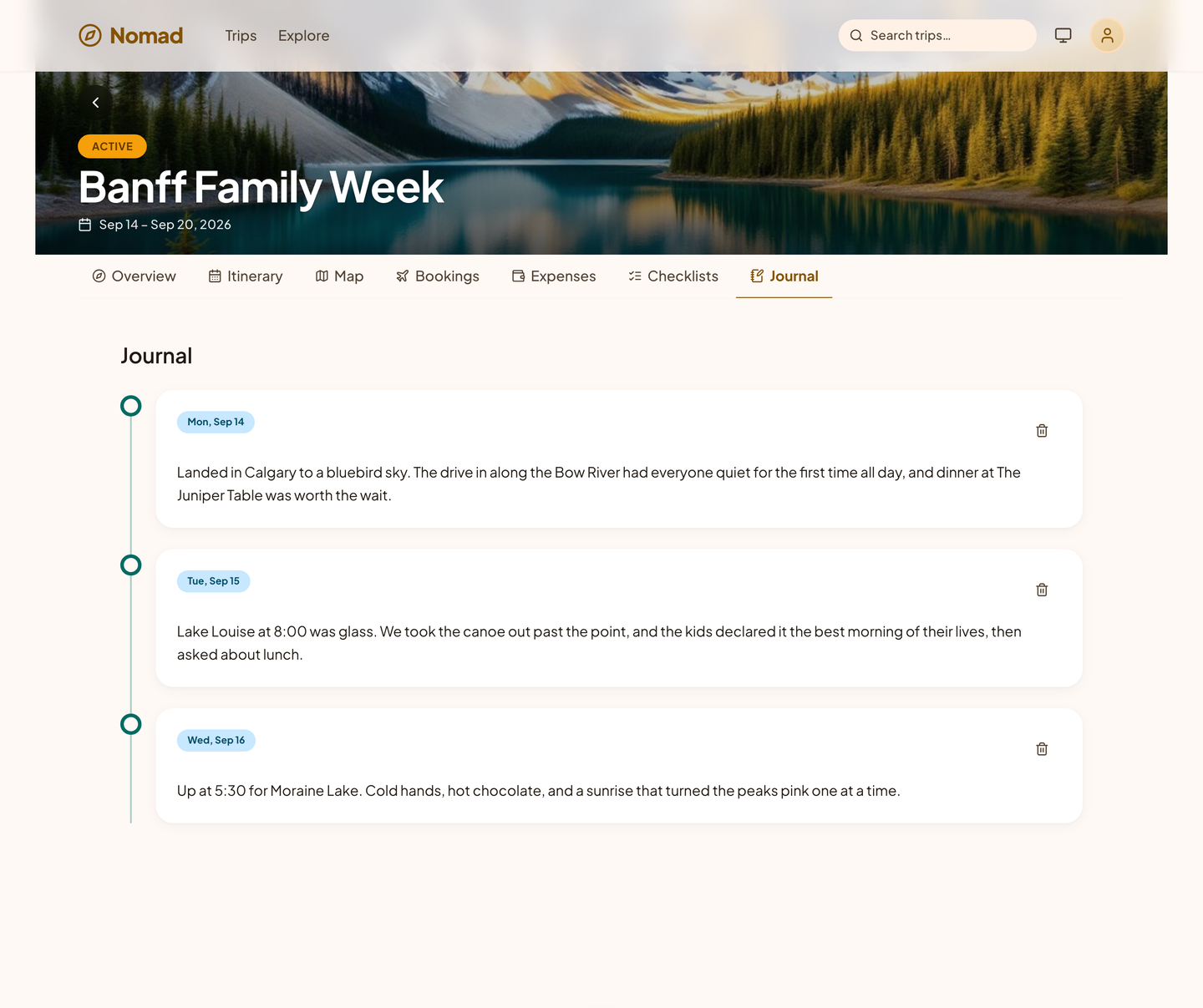
Write a few lines each day, add photos, and tie them to the places you went. When the trip is over, publish the journal as a travelogue with a link you can send to anyone.
Bring your trips with you.
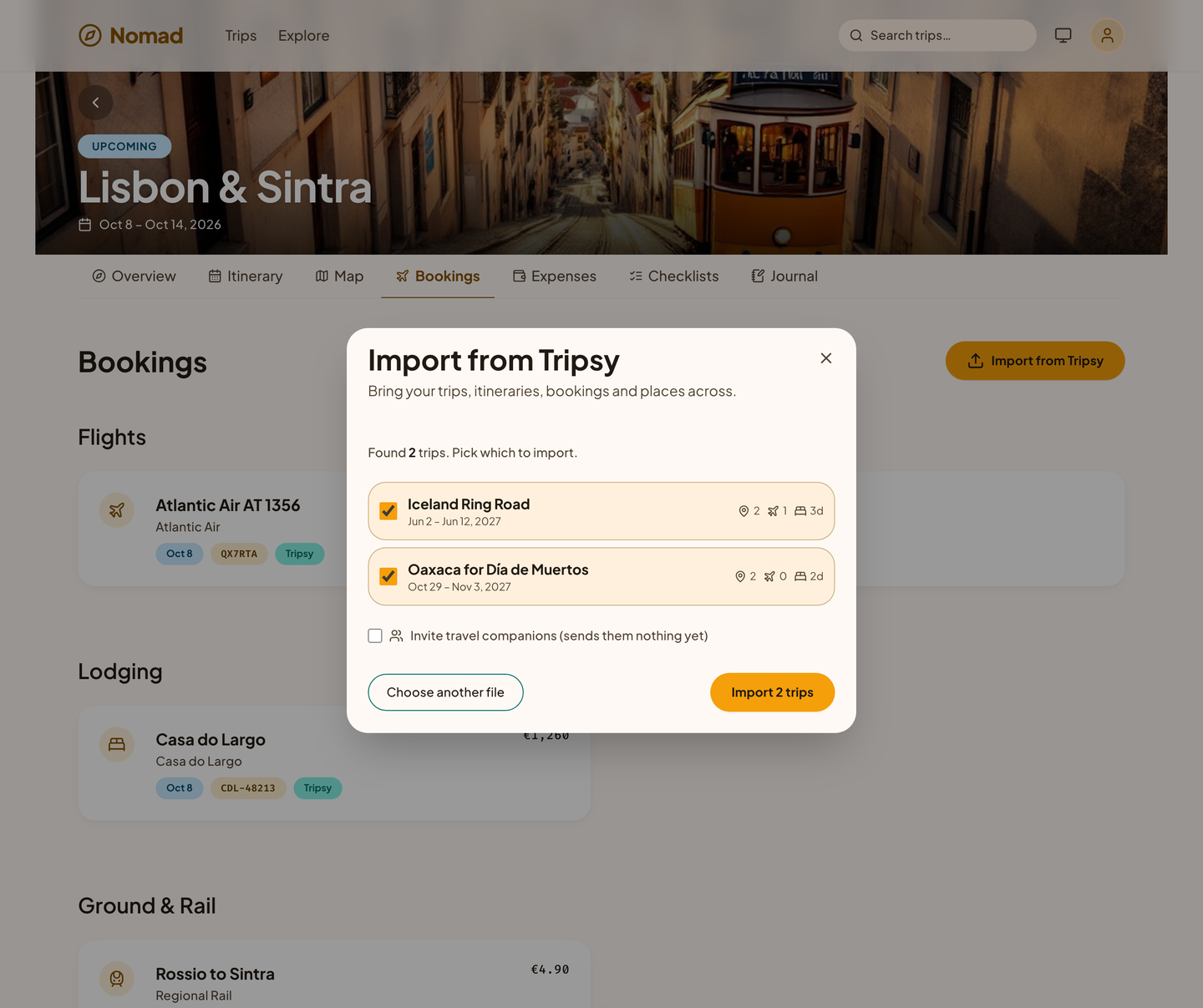
Nomad imports your Tripsy® trips in seconds: the days, places, bookings, and costs. Pick the trips you want, and nothing is duplicated if you import again.
One tool for every leg of the journey
Itineraries, reservations, places on a map, shared costs, packing and prep lists, shared planning, and a trip journal, all in one app, and all described here as Nomad will do them when it opens.
Day-by-day plans, down to the hour
- A day-by-day itinerary
- Every trip is dated days. Flights, check-ins, tables, tours, and notes land at their times, and ideas with no day yet wait until you give them one.
- Ten kinds of booking
- Flights, lodging, car rentals, trains, buses, ferries, restaurants, activities, events, and anything else, each with the fields that matter on the day: confirmation number, terminal, seat, and check-in time.
- Trip templates
- Save any trip of your own as a template, or duplicate one, and begin the next trip with the structure already in place.
- Search everything
- Trips, places, bookings, notes, and journal entries, searched as you type, in one trip or across all of them.
- A read-only link
- Share an itinerary and map with family at home. They need no account to see it, and cannot change anything.
Every booking, every pin, one map
- Import from your email
- Forward a confirmation, or let Nomad look through your mailbox. Everything read from an email waits in a review queue, and a confirmation forwarded twice is still one booking.
- Documents
- E-tickets, boarding passes, visas, and insurance cards, attached to the trip or to the booking they belong to, with a preview for every photo and PDF.
- Places and the map
- Save restaurants, museums, and trailheads with their addresses, see them all on one map, and show a single day's stops with the route between them.
- Comments where they belong
- Ask about the dinner reservation on the reservation itself, and mention someone to bring them in.
Eleven currencies, shared, and settled
- Costs in 11 currencies
- Log a cost in the currency you paid it in: US dollar, euro, pound, yen, Canadian dollar, Australian dollar, Swiss franc, Mexican peso, Polish zloty, Brazilian real, or Indian rupee. Nomad keeps the original and totals everything in your home currency at a fixed rate for each; live daily rates are planned.
- Three ways to split
- Split a cost equally, by exact amounts, or by shares, and keep a running balance for everyone on the trip.
- Settle up
- See the fewest payments that settle the trip, so nobody keeps a spreadsheet.
- Budgets and export
- A budget for the trip and for each category, and an export of the trip's costs to your books.
Packed and ready before you leave
- Packing lists
- What to bring, with a quantity for each item, shaped by the destination, the length of the trip, and what you plan to do.
- Prep lists
- Before-you-go tasks, each with a due date.
- Who is bringing what
- Assign any item to someone on the trip and watch everyone's progress live.
Live, role-based, and shared
- One plan for everyone
- Everyone on the trip works from the same plan. Live updates and a view of who else is looking are not in the web app yet.
- Owners, editors, and viewers
- Owners manage the trip, editors plan it, and viewers follow along. A person who is not on a trip cannot tell that it exists.
- A trip journal
- A few lines and some photos for each day, tied to the places you went, ready to publish as a travelogue when you are home.
- Built for assistants
- Nomad's tools are open to an AI assistant that you invite onto a trip, with the same sign-in and the same permissions you have.
See it in light and dark
Real captures of the running tool, with fictional StrataForge Robotics data. They follow your theme.
From a confirmation email to a travelogue
Import
Forward a confirmation or import a trip from another planner. Nomad reads the dates, codes, and addresses and puts each booking in a review queue before it lands on the right day.
Plan
Arrange the days, pin places to the map, build the packing list, and invite the people who are going. Everyone on the trip works from the same plan.
Travel
Your itinerary, bookings, and map open on your phone's browser. Log costs as you spend, in any of the 11 currencies Nomad supports.
Wrap up
See who owes whom, send reimbursable costs to the books, publish the journal as a travelogue, and save the trip as a template for next time.
Built so everyone can use Nomad.
Nomad's app was scanned with axe-core on all eight screens it shows here, in light and dark, at phone and desktop widths, and the last scan found no violations. That is a start, not a finish. This page says what has been checked and what has not.
Partly supported
Keyboard operation
The app starts with a "Skip to main content" link. Trips open from the keyboard with Enter or Space, and the rest of the controls are native buttons and links. Dialogs close on Escape but do not trap focus or return it afterward. A full keyboard-only walk has not been done.
Partly supported
Screen reader landmarks and labels
axe-core finds every control named, every landmark labeled, headings in order, and no ARIA role misuse on the eight screens scanned. Nobody has listened to Nomad with a screen reader.
Partly supported
Contrast in light and dark
axe-core's color-contrast rule passes on the eight screens scanned, in light and dark. Five color pairs failed on the first scan and were fixed, each with a test. Screens that were not scanned have not been checked.
Partly supported
Reduced motion
CSS animations and transitions switch off when the reader asks for reduced motion, through the Renkara design system's stylesheet. The dialog and the new-trip page animate with framer-motion springs, which ignore that setting. Nothing has been tested in a browser.
Not yet tested
Text resize and zoom
Not yet tested. Nobody has checked the app at 200 percent text size or browser zoom.
Partly supported
Mobile and touch
The app has a labeled bottom navigation bar for phones. The eight screens scanned at 375 by 667 pixels show no horizontal overflow and no axe-core violations. Touch target size has not been measured.
Under the hood
| Backend |
|
|---|---|
| Frontend |
|
| Fleet integration |
|
| Access and sharing |
|
| Stands in for | Shared trip spreadsheets, Screenshot folders, Group-chat link threads, Trip-planning apps |
Part of the Renkara fleet
- Courier
Booking confirmations in your mailbox become bookings in the trip, after your review.
- Cadence
The itinerary appears on your calendar, with the forecast for every day.
- Packed
A packing list built for the destination, the season, and the plan.
- Trellis
Trip costs can be sent to the books as expenses.
- Narrative
Your journal becomes a published travelogue.
Built for agents as well as people
Nomad exposes the whole trip to an AI assistant such as Claude, so it can list your trips, create one, add an itinerary item, log a cost, or check a budget, and only on the trips you share with it.
Trips and people
list_tripsget_tripcreate_triplist_members
Plans and bookings
add_itinerary_itemlist_reservations
Money, search, and health
log_expenseget_budget_summarysearchcheck_service_health
Nomad is not open yet. Be the first to know when it is.
Leave your email and we will write when Nomad opens. That is the only thing this list is for.
We will send one email to confirm your address. After that, we write only about Nomad opening, and every email has a one-click unsubscribe. What we keep, and why.
Tripsy is a registered trademark of Tripsy LLC. Claude and the Model Context Protocol are trademarks of Anthropic, PBC. Nomad is not affiliated with, endorsed by, or sponsored by any of them.
Questions people ask
When does Nomad open?
Nomad is not open yet. Join the waitlist, and we will email you the day it opens.
What will it cost?
Pricing has not been announced yet.
Do my travel companions need an account?
To plan with you, yes: they accept an invitation and edit the trip alongside you. To follow along, no: a read-only link shows the itinerary and map to anyone you send it to.
Does it work without a signal?
Not yet. Nomad needs a connection today. Keeping the trip on your device for offline use is planned.
Questions about this tool?
Write to Renkara Media Group and a person will answer.